Local (LAN or VPN)
Same network or VPN: connect directly to your Mac. No relay, no third party.
Traffic stays between your devices. Secure end-to-end.

Use Cursor from your phone, tablet, or any browser. Your code stays home.
Secure end-to-end. Use your Mac over LAN or VPN with no relay, or the optional relay when away. Strong host at home? Run RemoteKit on a Mac Mini or Mac Studio and connect from a cheap laptop or phone.
Changelog for this release. Download the Mac app (DMG) · ZIP · Open the PWA
Same network or VPN: connect directly to your Mac. No relay, no third party.
Traffic stays between your devices. Secure end-to-end.
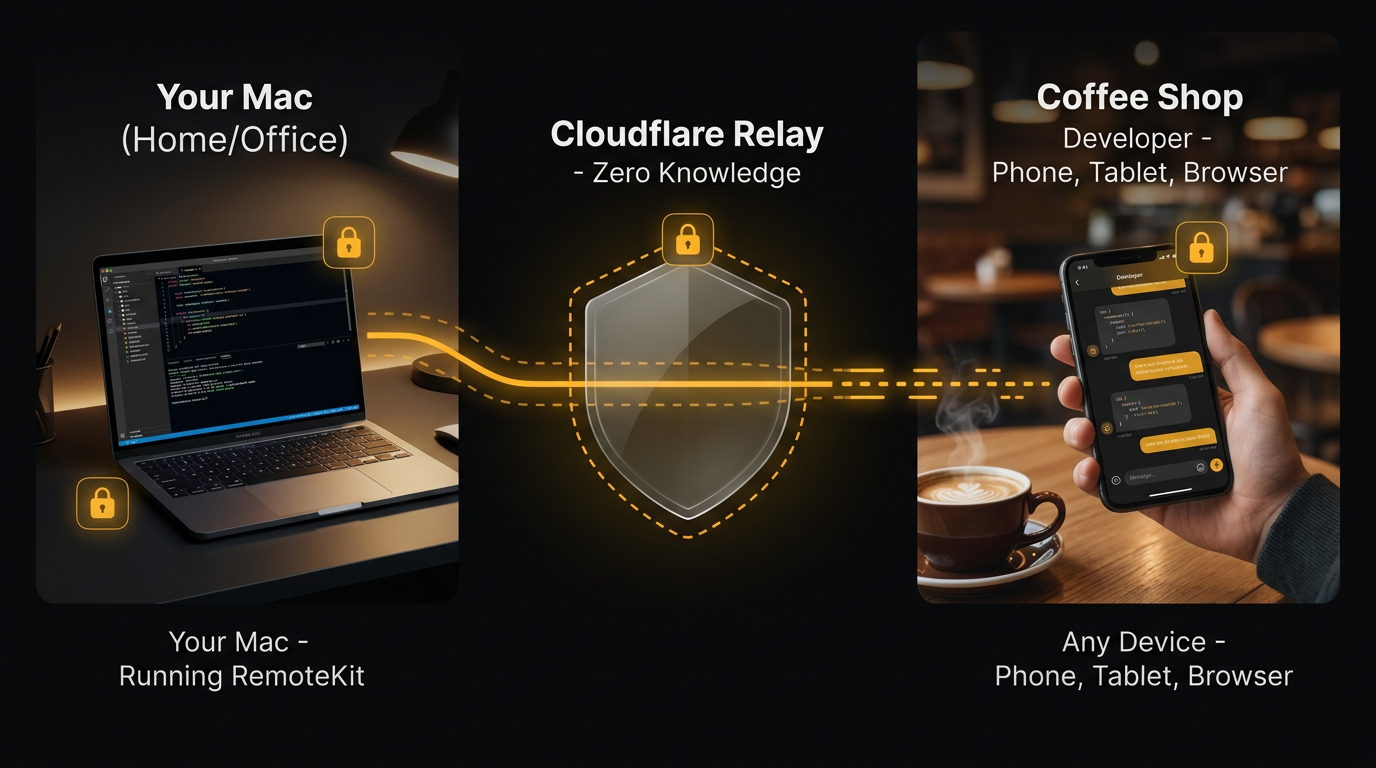
Away from home? Use the relay to reach your Mac from anywhere. E2E encrypted; relay is zero-knowledge. Self-host package coming soon.
Use hosted app.remotekit.ai or deploy your own when the relay package is released.
Menu bar app or CLI. Your agents, your projects.
Local: open PWA to Mac URL. Remote: use relay + room code. No app install.
Pick project and agent (Cursor, Copilot, Claude…). Same context as your IDE.
RemoteKit works with agents that speak the Agent Client Protocol. Currently supported and tested:
More ACP agents coming soon. Learn about ACP.
Leave your Mac Studio or Mac Mini at home. Code from anywhere on a MacBook Air, iPad, or phone.
Run RemoteKit and your ACP agent on a Mac Mini or Mac Studio. Connect from a cheap laptop or your phone over the relay. Same agent, same context – no need to run heavy IDEs on the road. Always-On mode keeps your host awake so you can connect anytime.
Offload the agent to your desktop: your MacBook stays cool and the battery lasts. The host keeps indexes and context warm so you don’t wait when you open the PWA at a café.
Easiest: download the Mac app (v0.3.7). First run opens a short Setup Guide; then use the menu bar or Dock launcher to start the bridge and get your room ID and PIN.
$ npx remotekitRequires the remotekit npm package. Until it’s published, use the Mac app.
Secure end-to-end. Strong perimeter, zero trust. Use the hosted relay at app.remotekit.ai; a self-hostable relay package is planned so you can deploy your own.
Part of the zero-trust initiative by Sergej Fedorovic (strt.it): dotenvup.com (encrypted .env) and unknownpassword.com (secure team secrets).
We plan to ship the relay as a package so you can deploy it yourself (e.g. on Cloudflare Workers), audit the code, and run a zero-knowledge relay under your control. Use the hosted app.remotekit.ai in the meantime.
Self-hostable relay package – coming soon.
RemoteKit is a universal mobile frontend for AI coding agents that support the Agent Client Protocol. Today it supports Cursor, with more ACP agents coming soon. It lets you use your coding agent from your phone, tablet, or browser while your code stays on your Mac.
RemoteKit is developed and operated by Pamakid s.r.o., Prokopova 148/15, 130 00 Praha 3, Czech Republic (IČO 10993843). Privacy and data protection: see our Privacy Policy.
Yes. RemoteKit uses end-to-end encryption. You can connect directly over LAN or VPN with no relay involved. When using the optional remote relay, all traffic is end-to-end encrypted and the relay is zero-knowledge.
No. RemoteKit runs as a progressive web app in your browser. Open `app.remotekit.ai` from any device and enter your room ID and PIN.
RemoteKit currently supports and has tested Cursor. Support for GitHub Copilot, Claude, Codex, Gemini CLI, OpenCode, Cline, Goose, Kilo, and other ACP agents is coming soon.
A self-hostable relay package is planned so you can deploy your own instance on Cloudflare Workers or compatible infrastructure. Today you can use the hosted relay at `app.remotekit.ai`.
Download the Mac app from `remotekit.ai` and run it. The first run opens a short setup guide. Then use the menu bar or Dock launcher to start the bridge and get your room ID and PIN. Open `app.remotekit.ai` on your phone or browser and enter that room ID and PIN.
Yes. Run RemoteKit on your Mac Mini or Mac Studio and connect from a MacBook Air, iPad, or phone from anywhere. Your agent and context stay on the desktop while you use a thin client remotely.
RemoteKit is developed and operated by Pamakid s.r.o., Prokopova 148/15, 130 00 Praha 3, Czech Republic (IČO 10993843). How we handle personal data is described in our Privacy Policy; terms of use are in our Terms of Service.
This site and release downloads are delivered using Cloudflare Pages. The hosted web app and relay at app.remotekit.ai run on Cloudflare Workers with Durable Objects; the relay forwards end-to-end encrypted traffic and does not inspect message contents. Cloudflare may process standard request metadata as part of providing its services — see Cloudflare’s Privacy Policy. Cloudflare publishes certifications and compliance materials (for example ISO 27001 and SOC 2 reports) in its Trust Hub; those apply to Cloudflare as a provider, not to Pamakid’s own certifications.
.dmg with menu bar app. Apple Silicon. First run opens a short Setup Guide.
Download v0.3.7Open app.remotekit.ai on your phone or browser and enter the room ID + PIN from your Mac.
Open app.remotekit.aiPower users: npx remotekit when the npm package is published. Docs coming soon.